

How to register my Android version with my transaction number?
Besides the subscription the buy-version doesn't need an internet connection urgently. But if you have one the register process is much easier:
Go to the menu 'More ->Settings ->Register':
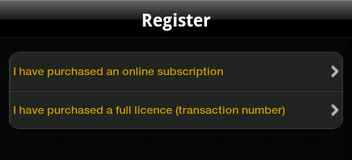
Choose the option 'I have purchase a full license':
If you have purchased a SiDiary USB stick, you can find the transaction number by starting SiDiary on the stick and then switch into the menu 'Help -> Register'.
Enter your transaction number (starting with the letter 'M') and click on 'Register' to finish the registration.
If you have any problems with it please don't hesitate to contact us at support.sidiary@sinovo.de. We will be glad to help you!